- Welcome to MultiMedia Soft forum.


Recent posts
#81
Audio playback and audio management components / Internal Error, cannot load en...
Last post by PatrickVossen - May 08, 2023, 01:49:17 PMHi Severino,
Today, creating a new build for one of our applications using MMS (AudioDjStudioF4.dll).
Always ran a rather old version (control 10.1.0.0 / engine 13.1.1.6) but updated to latest version (control 11.3.0.0 / engine 14.3.0.4)
But now I get a lot of "*** Internal Error, cannot load engine Number 12 due to error 126" errors.
A lot is, one in 5 application starts.
Also noticed that when I got this error, the content of one of the bass-dll's was written into my application logfile.
See attached image..
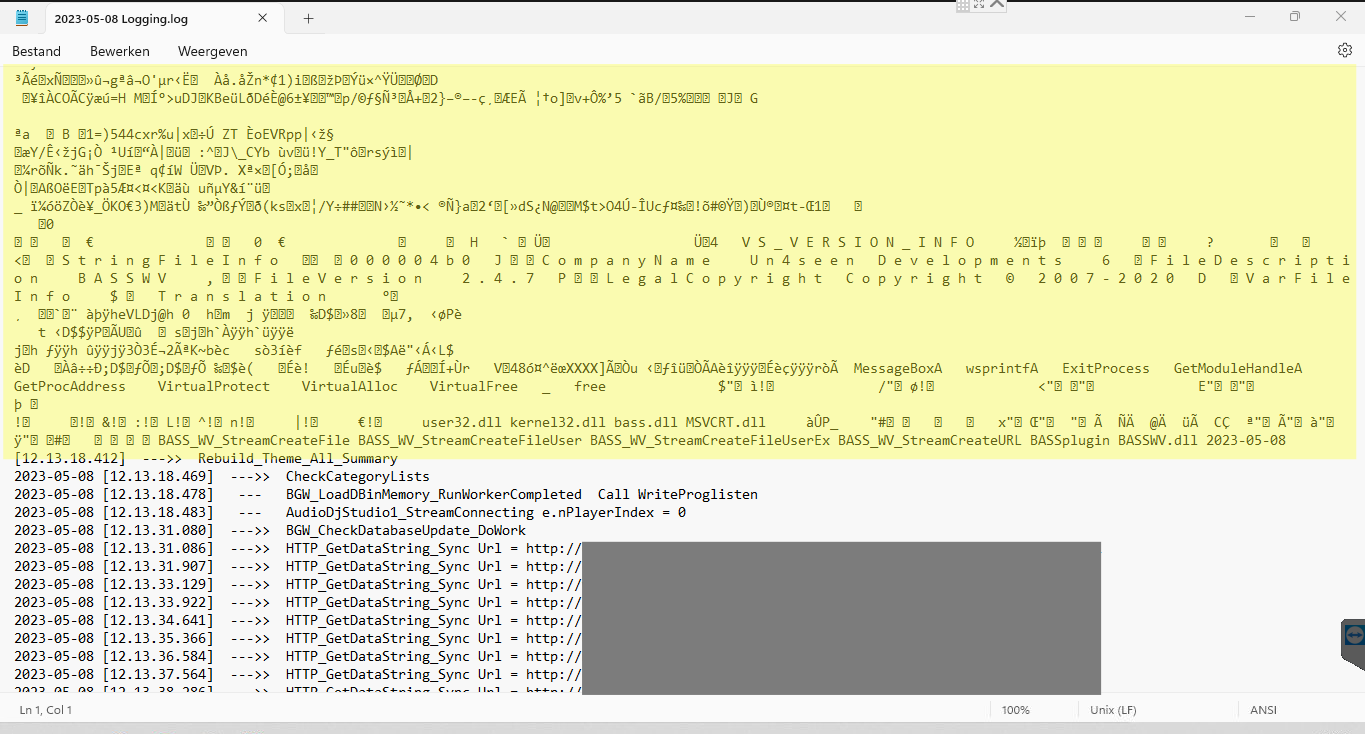
Tried writing text data using different way (FilePointer / StreamWriter) but that did not help.
Also checked windows antivirus software, but no mentioning for blocked files...
Do you know at what point the bass dll's are written?
Maybe I can disable all my read/write actions until the dll files are written..
Best regards
Patrick Vossen
Today, creating a new build for one of our applications using MMS (AudioDjStudioF4.dll).
Always ran a rather old version (control 10.1.0.0 / engine 13.1.1.6) but updated to latest version (control 11.3.0.0 / engine 14.3.0.4)
But now I get a lot of "*** Internal Error, cannot load engine Number 12 due to error 126" errors.
A lot is, one in 5 application starts.
Also noticed that when I got this error, the content of one of the bass-dll's was written into my application logfile.
See attached image..
Tried writing text data using different way (FilePointer / StreamWriter) but that did not help.
Also checked windows antivirus software, but no mentioning for blocked files...
Do you know at what point the bass dll's are written?
Maybe I can disable all my read/write actions until the dll files are written..
Best regards
Patrick Vossen
#82
Audio playback and audio management components / Re: How To Create Master Volum...
Last post by Administrator - May 05, 2023, 01:39:50 AMHello,
With regards to the first issue, you should create a custom stream mixer as described inside the related tutorial
https://www.multimediasoft.com/adjstudnet/help/adjstudnet_000075.htm
and attach both players to the mixer itself.
With regards to the second issue, K-Lite is needed if you want to play video files because it installs most of the needed DirectShow codecs used to decode the majority of video formats: its not needed for playing audio files only.
Hope this helps
Kind regards
Severino Delaurenti
MultiMedia Soft
With regards to the first issue, you should create a custom stream mixer as described inside the related tutorial
https://www.multimediasoft.com/adjstudnet/help/adjstudnet_000075.htm
and attach both players to the mixer itself.
With regards to the second issue, K-Lite is needed if you want to play video files because it installs most of the needed DirectShow codecs used to decode the majority of video formats: its not needed for playing audio files only.
Hope this helps
Kind regards
Severino Delaurenti
MultiMedia Soft
#83
Audio playback and audio management components / How To Create Master Volume St...
Last post by Ravindra - May 04, 2023, 06:04:48 PMHello,
1. First Issue
I have created sound system with two players.
First Player plays Audio or Video file having its own volume control
Second player is used for microphone input having its own volume control.
Is there any way to combine the volumes of both of these players to form a single stream and control
the combined input by independent volume control (Master Volume). It is just like a analog mixer.
2. Second issue
Is it mandatory to install K-lite codec on system for successful working of AudioDjStudio ?
Will it work without K-lite codec also?
Thanks and Regards,
Ravindra.
1. First Issue
I have created sound system with two players.
First Player plays Audio or Video file having its own volume control
Second player is used for microphone input having its own volume control.
Is there any way to combine the volumes of both of these players to form a single stream and control
the combined input by independent volume control (Master Volume). It is just like a analog mixer.
2. Second issue
Is it mandatory to install K-lite codec on system for successful working of AudioDjStudio ?
Will it work without K-lite codec also?
Thanks and Regards,
Ravindra.
#84
Audio playback and audio management components / Re: AdjMmsEng64 Error, "Intern...
Last post by Administrator - April 27, 2023, 04:21:56 PMHello,
the multimedia engine AdjMmsEng embeds other dlls that are instanced dynamically, when needed: if one of these dlls is targeted in error by the antivirus, due to a "false positive", it will be immediately deleted and/or blocked so the multimedia engine will fail to load it, resulting in the mentioned error message box being displayed.
Kind Regards
Severino Delaurenti
MultiMedia Soft
the multimedia engine AdjMmsEng embeds other dlls that are instanced dynamically, when needed: if one of these dlls is targeted in error by the antivirus, due to a "false positive", it will be immediately deleted and/or blocked so the multimedia engine will fail to load it, resulting in the mentioned error message box being displayed.
Kind Regards
Severino Delaurenti
MultiMedia Soft
#85
Audio playback and audio management components / Re: AdjMmsEng64 Error, "Intern...
Last post by Terry - April 27, 2023, 07:36:48 AMHi,
I got a brand new computer and made sure no other your component is running.
Problems occur if antivirus software (Windows 10 Microsoft Defender) is turned on, but sometimes the error will not appear after executing a few times.
If antivirus is turned off, it executes normally without any errors no matter how many times.
I really don't understand what this has to do with antivirus software.
Kind Regards
Terry
I got a brand new computer and made sure no other your component is running.
Problems occur if antivirus software (Windows 10 Microsoft Defender) is turned on, but sometimes the error will not appear after executing a few times.
If antivirus is turned off, it executes normally without any errors no matter how many times.
I really don't understand what this has to do with antivirus software.
Kind Regards
Terry
#86
Audio playback and audio management components / Re: Can we create Audio Mixer ...
Last post by Administrator - April 19, 2023, 04:27:41 PMHello,
the issue should be fixed inside the latest build 14.4 of the multimedia engine; you can get the latest build of the multimedia engine from the link below:
https://www.multimediasoft.com/bins/AdjMmsEng14.zip
and you can use it to replace existing instances on your PC under the following folders:
* C:\Program Files\MultiMedia Soft\Audio DJ Studio for .NET\Redist
* If your machine has a x86 version of Windows
- C:\Windows\System32
* If your machine has a x64 version of Windows
- C:\Windows\SysWOW64
The x64 version is available as well on the link below:
https://www.multimediasoft.com/bins/AdjMmsEng14_64.zip
and you can use it to replace existing instances on your PC under the following folders:
* C:\Program Files\MultiMedia Soft\Audio DJ Studio for .NET\Redist
* If your machine has a x64 version of Windows
- C:\Windows\System32
Kind regards
Severino Delaurenti
MultiMedia Soft
the issue should be fixed inside the latest build 14.4 of the multimedia engine; you can get the latest build of the multimedia engine from the link below:
https://www.multimediasoft.com/bins/AdjMmsEng14.zip
and you can use it to replace existing instances on your PC under the following folders:
* C:\Program Files\MultiMedia Soft\Audio DJ Studio for .NET\Redist
* If your machine has a x86 version of Windows
- C:\Windows\System32
* If your machine has a x64 version of Windows
- C:\Windows\SysWOW64
The x64 version is available as well on the link below:
https://www.multimediasoft.com/bins/AdjMmsEng14_64.zip
and you can use it to replace existing instances on your PC under the following folders:
* C:\Program Files\MultiMedia Soft\Audio DJ Studio for .NET\Redist
* If your machine has a x64 version of Windows
- C:\Windows\System32
Kind regards
Severino Delaurenti
MultiMedia Soft
#87
Audio playback and audio management components / Re: Can we create Audio Mixer ...
Last post by Ravindra - April 19, 2023, 06:55:43 AMHello Severino,
I am attaching the Project for your reference.
Thanks And Regards,
Not a valid attachment ID.
Ravindra.
I am attaching the Project for your reference.
Thanks And Regards,
Not a valid attachment ID.
Ravindra.
#88
Audio playback and audio management components / Re: Can we create Audio Mixer ...
Last post by Administrator - April 18, 2023, 03:22:08 PMHello,
could you be so kind to attach the modified AsioSpeakersManager project? In this way we could test your code directly.
Kind regards
Severino Delaurenti
MultiMedia Soft
could you be so kind to attach the modified AsioSpeakersManager project? In this way we could test your code directly.
Kind regards
Severino Delaurenti
MultiMedia Soft
#89
Audio playback and audio management components / Re: Can we create Audio Mixer ...
Last post by Ravindra - April 18, 2023, 03:07:17 PMHello Severino,
Thanks a lot for your guidance so far......
As per your suggestion i checked your doubt, but i have applied the equalizer to my second player correctly.
Actually i have given microphone input this channel. I am getting good sound and rest of the things like volume / Reverb are working fine.
In fact i modified the sample project AsioSpeakersManager in your VB.NET directory and applied the equalizer but no success.
Can you further investigate and suggest the right code to be written.
Thanks and Regards,
Ravindra.
Thanks a lot for your guidance so far......
As per your suggestion i checked your doubt, but i have applied the equalizer to my second player correctly.
Actually i have given microphone input this channel. I am getting good sound and rest of the things like volume / Reverb are working fine.
In fact i modified the sample project AsioSpeakersManager in your VB.NET directory and applied the equalizer but no success.
Can you further investigate and suggest the right code to be written.
Thanks and Regards,
Ravindra.
#90
Audio playback and audio management components / Re: AdjMmsEng64 Error, "Intern...
Last post by Administrator - April 12, 2023, 11:41:00 PMHello,
the code you are using doesn't seem to be wrong so the issue could be related to some issue with your PC: as mentioned before, it would be important to know if an antivirus is running and if the issue happens when the antivirus is disabled and, as a second test, to be sure that no other application that may use our component is running.
Kind Regards
Severino Delaurenti
MultiMedia Soft
the code you are using doesn't seem to be wrong so the issue could be related to some issue with your PC: as mentioned before, it would be important to know if an antivirus is running and if the issue happens when the antivirus is disabled and, as a second test, to be sure that no other application that may use our component is running.
Kind Regards
Severino Delaurenti
MultiMedia Soft